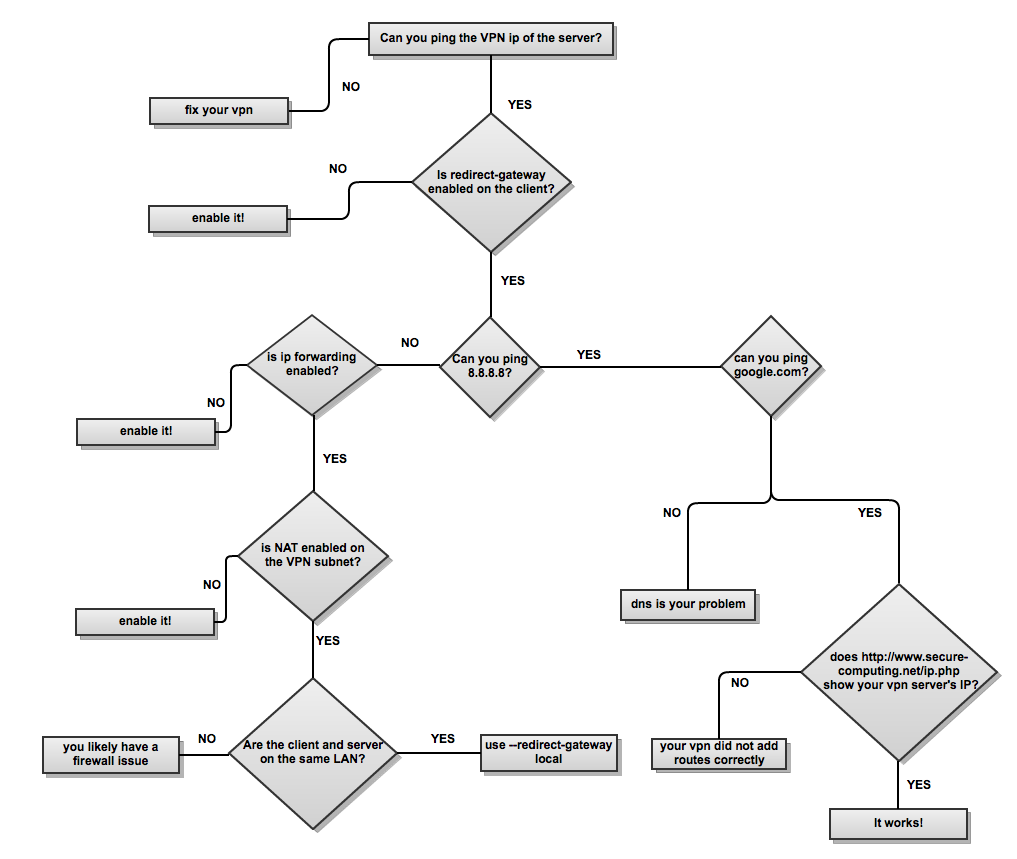

Recently I setup an OpenVPN server on my remote Ubuntu Server (18.04) for all my internet traffic. After completing all the steps, I have done some extras for both of the client and server side machines. Also, my wifi access point-router needs an adjustment for handling TLS handshaking process.
First things first I have enabled and assigned the floating-ip to the droplet and setup the server like this. Then, I have found my anchor-ip with
curl -s http://169.254.169.254/metadata/v1/interfaces/public/0/anchor_ipv4/address
I have added local anchor-ip to server.conf
sudo nano /etc/openvpn/server.conf
I added following rules for Ubuntu’s firewall and postrouting:
sudo iptables -t nat -A POSTROUTING -s 10.8.0.0/24 -j SNAT --to-source anchor-ip
sudo iptables -A INPUT -i eth0 -p udp -m state --state NEW -m udp --dport 1194 -j ACCEPT
sudo iptables -A INPUT -i tun+ -j ACCEPT
sudo iptables -A OUTPUT -o tun+ -j ACCEPT
Then I need to save the rules, because they were not persistent and will remove after reboot. Iptables-persistent is nice tool for this.
sudo apt install iptables-persistent netfilter-persistent
The two packages are similar, but provide slightly different functionality. If you only install iptables-persistent, you won’t get the service definition file for correct handling in systemd, eg /lib/systemd/system/netfilter-persistent.service. If you only install netfilter-persistent, you will find that rules are not correctly applied at boot.
Rules can be saved in a file with the (root) command iptables-save for IPv4:
iptables-save > /etc/iptables/rules.v4
These files can be loaded again with the command iptables-restore for IPv4.
iptables-restore < /etc/iptables/rules.v4
Recent versions of iptables-persistent have two configuration files: /etc/iptables/rules.v4 for the IPv4 ruleset, and /etc/iptables/rules.v6 for the IPv6 ruleset.
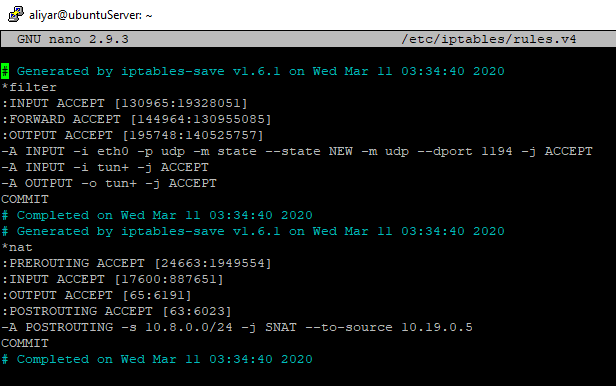
Here is my IPv4 file:
To save all filter rules:
netfilter-persistent save
or to load them:
netfilter-persistent start
Here is my server route table:
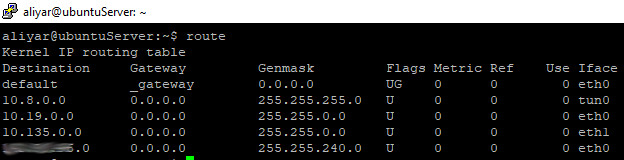
tun0: my virtual VPN networkcard / eth0: normal networkcard / 10.8.0.0: my VPN network ip block.
I have restarted OpenVPN with
sudo systemctl restart openvpn@server
I have updated in my local user.ovpn the ip of the floating-ip (replacing the line remote with remote floating-ip 1194)
After this I added following rules for OpenVPN to the digitalocean’s droplet firewall panel, then I add this ruleset to my droplet. Here is port informations for OpenVPN:
UDP ports: 1194, 1197, 1198, 8080, 9201 and 53.
TCP ports 502, 501, 443, 110, and 80.
At this point I can not connect OpenVPN GUI from my Windows 10 client on my Wifi router, because of the MTU size setting on the TCP packet in the router. The size was set to 1452 bytes instead of 1492 bytes. Because of that the SSL/TLS packet was fragmented and the server ACK was not received. On changing the MTU size, everything works perfectly. Also, I disabled the Windows 10 firewall for TAP device.
If I run netstat -anr and netstat -ltnup | grep 1194 everything seems fine. Also if I run curl --interface anchor-ip https://api.ipify.org/ or wget --bind-address=anchor-ip https://api.ipify.org/ I get the correct (floating) ip.
Here is my Windows 10 (TAP) client configuration (.OVPN file):
block-outside-dns
auth-nocache
key-direction 1
client
dev tun
proto udp
remote //my floating-ip// 1194
resolv-retry infinite
nobind
persist-key
persist-tun
ca ca.crt
cert client.crt
key client.key
remote-cert-tls server
tls-auth ta.key 1
auth SHA256
cipher AES-256-CBC
verb 3
Here is my Ubuntu Server 18.04 LTS /etc/openvpn/server.conf file:
key-direction 0
local //my-anchor-ip//
port 1194
proto udp
dev tun
ca ca.crt
cert server.crt
key server.key
dh dh.pem
topology subnet
server 10.8.0.0 255.255.255.0
ifconfig-pool-persist /var/log/openvpn/ipp.txt
push "route 0.0.0.0 0.0.0.0"
push "redirect-gateway def1"
push "dhcp-option DNS 8.8.8.8"
keepalive 10 120
tls-auth ta.key 0
cipher AES-256-CBC
auth SHA256
user nobody
group nogroup
persist-key
persist-tun
status /var/log/openvpn/openvpn-status.log
verb 3
explicit-exit-notify 1